
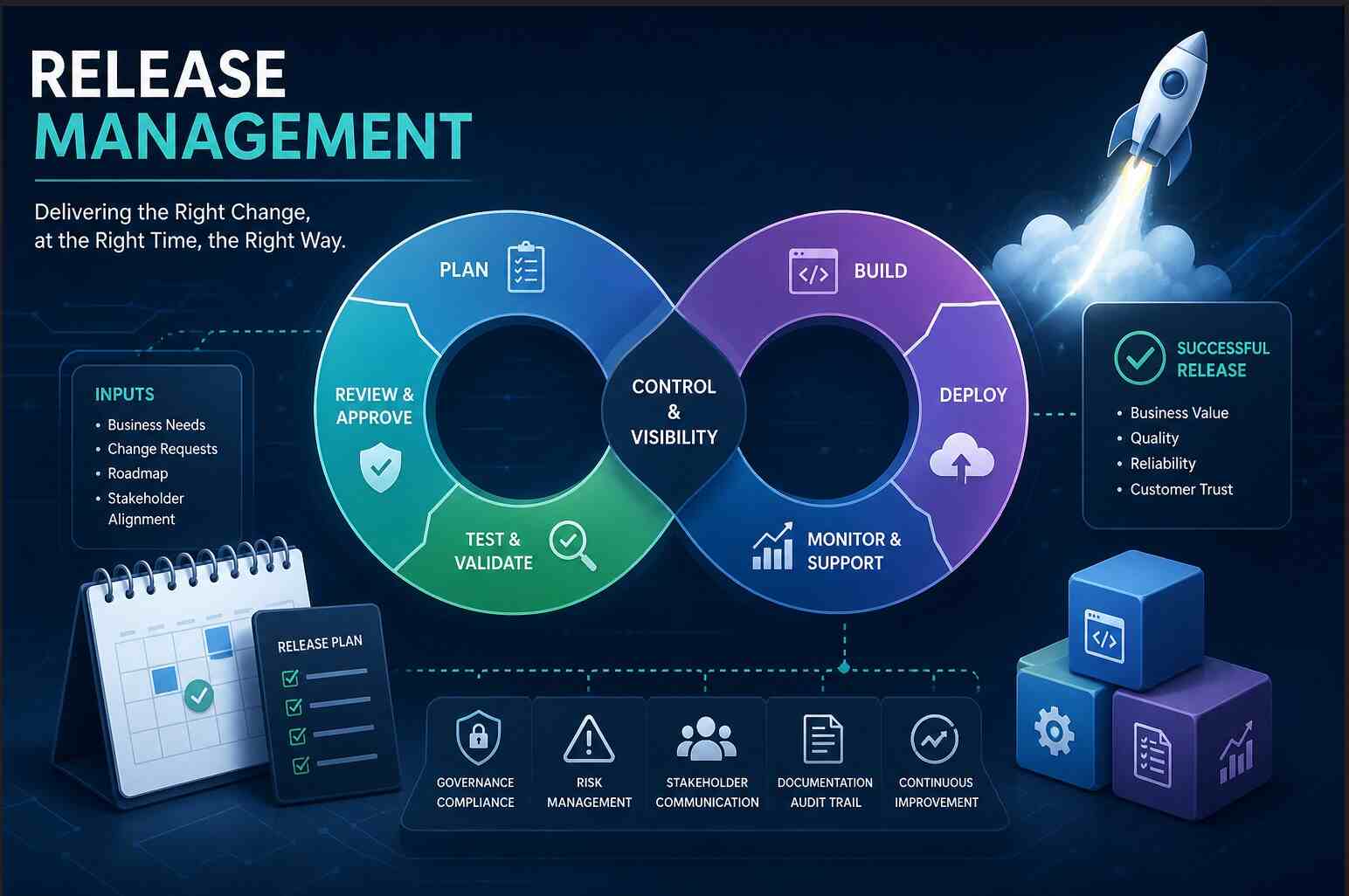
The Complete Release Management Guide: Strategy, Governance, Environments, and KPIs is your end-to-end resource for building or auditing a mature release management function. In this guide, we move beyond simple deployment checklists to cover every chronological phase of the release lifecycle — from strategic inputs and governance frameworks to environment strategies (SIT, E2E, Pre-Prod, Prod), approval processes including the role of the Change Advisory Board (CAB), emergency deployments, rollback strategies, cooling periods, and the KPIs and dashboards that measure success.
Whether you are a release manager, PMO lead, DevOps engineer, or IT governance professional, this guide provides a practical, sequential framework to reduce deployment failures, improve compliance, and increase release velocity.
The Complete Guide on Release Management
Key Takeaways (Executive Summary)
| Area | What Matters Most | Why It’s Critical |
|---|---|---|
| Governance | Clear policies, release classification, and oversight boards | Prevents chaos and ensures compliance |
| Planning | Well-defined release calendar and dependency mapping | Avoids conflicts and missed timelines |
| Risk & Compliance | Strong risk assessment and Go/No-Go controls | Reduces production failures |
| Roles & Communication | Defined ownership and structured communication | Eliminates confusion during execution |
| Readiness | Code, infrastructure, and environments aligned | Ensures smooth testing and deployment |
Sections Summary: A Complete Guide on Release Management
1. Governance & Strategic Alignment
- Business & Strategic Inputs
- Release Governance Framework
- Release Classification
- Governance Bodies (Oversight Structure)
- Policies, Standards & Controls
- Audit & Compliance Alignment
2. Release Planning & Calendar
- Release Calendar
- Release Scope Definition
- Dependency Management
- Resource & Capacity Planning
- Stakeholder Alignment
- Release Strategy (Delivery Model)
3. Risk, Compliance & Change Readiness
- Risk Assessment Matrix
- Compliance Checkpoints
- Change Readiness Criteria
- Go / No-Go Decision Framework
- Change Request Lifecycle
- Documentation & Evidence Management
FREE Heat Map Tool For Risk Management – 6 Excellent Templates – Exceediance
4. Roles, RASCI & Communication Model
- RASCI Framework
- Key Roles in Release Management
- Communication Model
- Meeting Framework
- Escalation Model
5. Code & Environment Readiness
- Environment Strategy
- Code Management & Version Control
- Infrastructure Readiness
- CI/CD Pipelines & Automation
- Configuration Management
- Security Integration (DevSecOps)
6. Quality Assurance & Testing Gates
- Testing Strategy (Multi-Layer Validation)
- Quality Gates (Control Points)
- Defect Management & Triage
- Test Data Management
- Test Automation
- Test Reporting & Sign-Off
25 Critical Components of a Testing Strategy – Exceediance
7. Approval Workflow & CAB Process
- Approval Workflow
- Change Advisory Board (CAB)
- CAB Evaluation Criteria
- Go / No-Go Meeting
- Pre-Deployment Communication
- Emergency Change Approval Process
8. Deployment Planning & Execution
- Deployment Strategy
- Deployment Planning & Runbook
- Environment Deployment Sequence
- Pre-Deployment Validation
- Rollback & Fallback Strategy
- Deployment Execution
- Smoke Testing & Immediate Validation
- Hypercare / Cooling Period
9. Post-Deployment Verification & Monitoring
- Post-Deployment Verification
- Monitoring & Observability
- Incident Detection & Management
- KPI Tracking & Metrics
- Business Validation
- Audit Trail & Documentation
- Reporting & Communication
10. Continuous Improvement & Closure
- Release Metrics & KPI Analysis
- Post-Release Retrospective
- Root Cause Analysis (RCA)
- Lessons Learned Repository
- Process Improvement Actions
- Training & Capability Enhancement
- Knowledge Sharing & Documentation Updates
- Formal Release Closure
50 Most Important KPIs for your Business – Exceediance
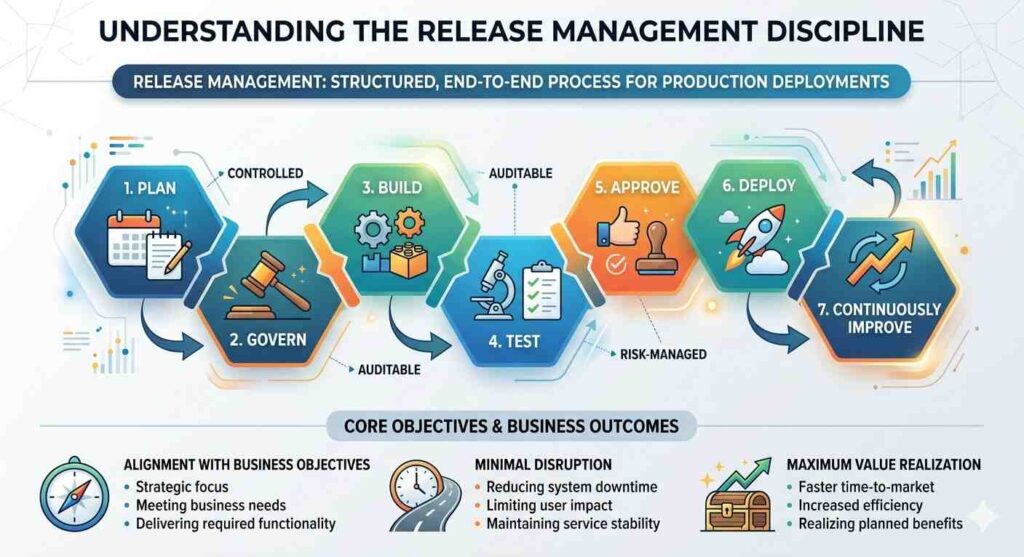
Release Management in a modern IT and business environment is a structured, end-to-end discipline that governs how changes are planned, built, tested, approved, and deployed into production systems. It goes beyond simply moving code to live environments—it ensures that every release is aligned with business objectives, meets quality standards, and is delivered in a controlled, auditable, and risk-managed manner. By integrating governance, compliance, and cross-functional coordination, Release Management provides the foundation for delivering change safely without disrupting ongoing operations. The Complete Guide on Release Management
In mature organizations, Release Management acts as a bridge between technology and business value. It ensures that releases are not just technically successful, but also deliver measurable outcomes while minimizing risk and maintaining system stability. With clearly defined processes, accountability, and continuous improvement mechanisms, it transforms releases from high-risk events into predictable, repeatable, and efficient business enablers.
1. Strategic Inputs & Governance
Why Governance Is the Backbone of Release Management
Governance ensures that every release is:
- Aligned with business goals
- Controlled and traceable
- Safe to deploy
Without governance, releases become unpredictable—teams push changes based on urgency rather than priority, approvals get skipped, and risks go unnoticed until production issues occur.
Project and PMO Governance in Jira – 15 Recommended Dashboard – Exceediance
Core Components of Release Governance
1. Business & Strategic Inputs
What This Means
Every release should exist for a reason—typically to deliver business value such as new features, regulatory compliance, or operational improvements.
What This Function Does
- Connects IT releases to business outcomes
- Ensures prioritization is based on value, not noise
- Prevents unnecessary or low-impact releases
Recommended Approach
- Align releases with:
- Product roadmap
- Business goals (e.g., revenue, customer experience)
- Require business justification before approving a release
- Maintain a central backlog linked to release plans
What Could Go Wrong If Ignored
- Teams release features no one needs
- High-value initiatives get delayed
- Misalignment between IT and business stakeholders
2. Release Governance Framework
What This Means
A structured set of rules that defines how releases are planned, approved, and controlled.
What This Function Does
- Standardizes release processes across teams
- Ensures consistency and accountability
- Reduces dependency on individuals
Recommended Approach
- Define:
- Release policies (what must be done before deployment)
- Approval workflows
- Mandatory documentation
- Use a stage-gate model (Plan → Prepare → Test → Approve → Deploy → Verify → Close)
- Integrate with Change Management processes
What Could Go Wrong If Ignored
- Every team follows a different process
- Approvals are skipped or inconsistent
- Increased risk of production failures
3. Release Classification
What This Means
Not all releases are equal—some are high-risk, others are routine. Classification helps apply the right level of control.
What This Function Does
- Determines approval level required
- Defines testing rigor
- Controls deployment urgency
Recommended Approach
Use clear categories:
- Major Releases
- High impact (e.g., new system, large changes)
- Full testing + CAB approval
- Minor Releases
- Enhancements or small fixes
- Streamlined approval
- Emergency Releases
- Critical production fixes
- Fast-tracked approvals with post-review
What Could Go Wrong If Ignored
- Minor changes get over-engineered (slow delivery)
- Major changes get under-controlled (high risk)
- Emergency fixes create more problems than they solve
4. Governance Bodies (Oversight Structure)
What This Means
Defined groups responsible for reviewing, approving, and monitoring releases.
What This Function Does
- Provides independent oversight
- Ensures risks are evaluated objectively
- Prevents unilateral decision-making
Typical Governance Bodies
- Change Advisory Board (CAB)
Reviews and approves significant changes - Release Board / Steering Committee
Aligns releases with business priorities - Technical Authority (TDA)
Ensures architectural and technical compliance
Recommended Approach
- Define:
- Who participates in each board
- What decisions they are responsible for
- Keep meetings:
- Structured
- Time-bound
- Use standard evaluation criteria (risk, impact, readiness)
What Could Go Wrong If Ignored
- Decisions made without proper review
- Bias or pressure influencing approvals
- Lack of accountability for failures
5. Policies, Standards & Controls
What This Means
Rules that must be followed before a release can move forward.
What This Function Does
- Ensures minimum quality and compliance standards
- Provides a checklist for readiness
- Reduces variability across releases
Recommended Approach
Define mandatory controls such as:
- Code review completed
- Testing passed (with defined thresholds)
- Security checks cleared
- Documentation updated
Use checklists or automated gates in CI/CD pipelines.
What Could Go Wrong If Ignored
- Incomplete or untested code reaches production
- Security vulnerabilities are introduced
- Teams skip critical steps under pressure
6. Audit & Compliance Alignment
What This Means
Ensuring every release is traceable, documented, and compliant with internal/external requirements.
What This Function Does
- Enables audits (internal and regulatory)
- Provides historical traceability
- Protects the organization legally and operationally
Recommended Approach
Maintain:
- Release records (what was deployed, when, by whom)
- Approval logs
- Change history
Use tools like:
- ITSM systems (e.g., ServiceNow, Jira Service Management)
What Could Go Wrong If Ignored
- Failed audits
- Regulatory penalties
- Inability to trace root cause of incidents
Governance in Action (Simple Flow)
- Business defines need
- Release is classified
- Governance rules define required steps
- Oversight bodies review and approve
- Controls ensure readiness
- Audit trail captures everything
Summary Table
| Component | Purpose | Risk if Missing |
|---|---|---|
| Strategic Inputs | Align IT with business goals | Misaligned priorities |
| Governance Framework | Standardize process | Inconsistent execution |
| Release Classification | Apply right level of control | Over/under governance |
| Governance Bodies | Provide oversight | Poor decision-making |
| Policies & Controls | Ensure readiness | Low quality releases |
| Audit & Compliance | Ensure traceability | Audit failures |
2. Release Planning & Calendar
Why Release Planning Is Critical
Even with strong governance, a release can fail due to:
- Conflicting schedules
- Unmanaged dependencies
- Resource shortages
Release planning ensures that the right things are delivered, at the right time, with the right coordination.
Core Components of Release Planning
1. Release Calendar
What This Means
A centralized schedule that defines when releases will occur across the organization.
What This Function Does
- Prevents overlapping or conflicting deployments
- Aligns releases with business cycles (e.g., peak seasons, financial closures)
- Provides visibility to all stakeholders
Recommended Approach
- Maintain a shared release calendar accessible to all teams
- Define:
- Release dates
- Freeze periods (e.g., year-end, major events)
- Maintenance windows
- Align with:
- Business events (sales campaigns, product launches)
- Operational constraints
What Could Go Wrong If Ignored
- Multiple teams deploy at the same time → system instability
- Releases happen during critical business periods → revenue impact
- Stakeholders remain unaware → poor coordination
2. Release Scope Definition
What This Means
Clearly defining what is included (and excluded) in a release.
What This Function Does
- Sets expectations for stakeholders
- Prevents scope creep
- Ensures focused delivery
Recommended Approach
- Define:
- Features included
- Bug fixes included
- Known exclusions
- Link scope to:
- Business priorities
- Backlog items
- Freeze scope before moving to execution phases
What Could Go Wrong If Ignored
- Continuous changes delay release timelines
- Teams lose focus on priorities
- Increased defects due to rushed additions
3. Dependency Management
What This Means
Identifying and managing interdependencies between systems, teams, and tasks.
What This Function Does
- Ensures all required components are ready
- Prevents last-minute surprises
- Enables coordinated execution
Types of Dependencies
- Application-to-application
- Infrastructure dependencies
- Third-party/vendor dependencies
- Data dependencies
Recommended Approach
- Create a dependency map early in planning
- Assign owners for each dependency
- Track dependency status regularly
- Include dependencies in risk assessments
What Could Go Wrong If Ignored
- One missing dependency blocks the entire release
- Delays cascade across teams
- Increased risk of partial or failed deployment
4. Resource & Capacity Planning
What This Means
Ensuring that the right people and skills are available at the right time.
What This Function Does
- Prevents bottlenecks
- Ensures smooth execution across phases
- Supports realistic timelines
Recommended Approach
Plan for:
- Development capacity
- QA/testing resources
- Infrastructure/support teams
- Release and deployment teams
Also consider:
- Holidays and leaves
- Parallel project commitments
- Skill availability
What Could Go Wrong If Ignored
- Critical tasks delayed due to lack of resources
- Overworked teams leading to errors
- Missed deadlines
5. Stakeholder Alignment
What This Means
Ensuring that all key stakeholders are aware, aligned, and committed to the release plan.
What This Function Does
- Reduces misunderstandings
- Ensures business readiness
- Improves decision-making speed
Key Stakeholders
- Business owners
- Product managers
- IT teams
- Operations/support teams
Recommended Approach
- Conduct release planning meetings
- Share:
- Scope
- Timeline
- Risks
- Get early sign-off from business stakeholders
- Maintain continuous communication
What Could Go Wrong If Ignored
- Business teams unprepared for release
- Last-minute objections or delays
- Misalignment on priorities
6. Release Strategy (Delivery Model)
What This Means
Choosing how the release will be delivered.
What This Function Does
- Defines speed vs control balance
- Impacts risk level and flexibility
Common Strategies
- Phased Releases
- Structured, controlled rollout
- Suitable for large organizations
- Big Bang Releases
- Full deployment at once
- Higher risk, faster delivery
- Continuous Delivery
- Frequent, incremental updates
- Requires strong automation
Recommended Approach
- Choose strategy based on:
- System criticality
- Risk tolerance
- Organizational maturity
- For most enterprises:
- Combine phased + controlled releases with automation
What Could Go Wrong If Ignored
- Wrong strategy increases failure risk
- Overly aggressive releases cause instability
- Overly cautious approach delays business value
Release Planning Workflow (Simplified)
- Define release scope
- Identify dependencies
- Allocate resources
- Align stakeholders
- Finalize release calendar
- Confirm release strategy
Practical Planning Checklist
- Release dates confirmed
- Scope finalized and approved
- Dependencies mapped and tracked
- Resources allocated
- Stakeholders aligned
- Risks identified
Summary Table
| Component | Purpose | Risk if Missing |
|---|---|---|
| Release Calendar | Schedule coordination | Conflicting deployments |
| Scope Definition | Clear deliverables | Scope creep |
| Dependency Management | Ensure readiness | Deployment failure |
| Resource Planning | Ensure capacity | Delays and burnout |
| Stakeholder Alignment | Business readiness | Miscommunication |
| Release Strategy | Define delivery model | Increased risk |
3. Risk, Compliance & Change Readiness
Why This Phase Is Non-Negotiable
Before any release is approved, organizations must answer one key question:
“Are we confident this change is safe to deploy?”
This phase ensures:
- Risks are identified and controlled
- Compliance requirements are met
- The organization is fully prepared for change
Without this, deployments become gambling instead of controlled execution.
Core Components
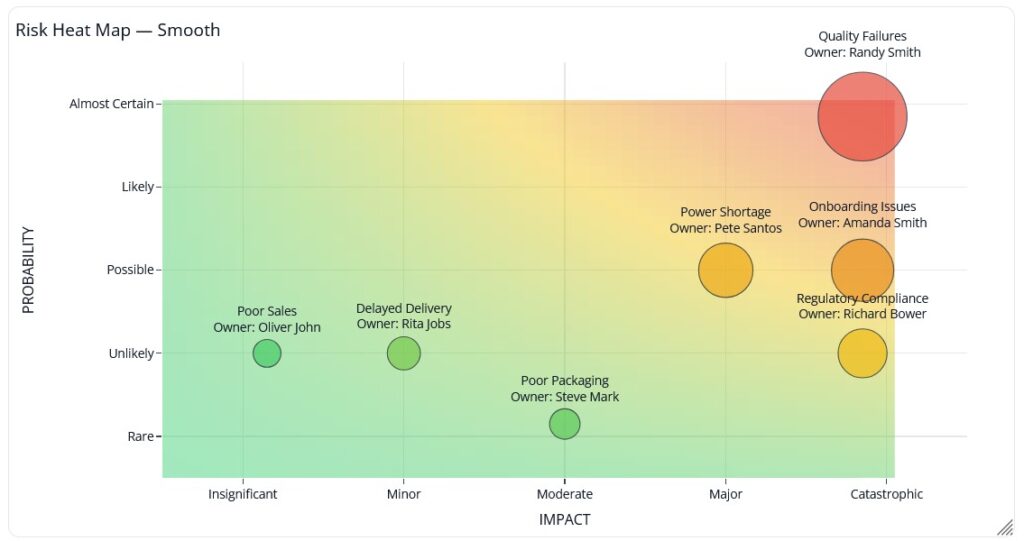
1. Risk Assessment Matrix
What This Means
A structured way to evaluate what could go wrong, how severe it would be, and how likely it is to happen.
What This Function Does
- Identifies potential failures before they occur
- Helps prioritize mitigation efforts
- Supports informed decision-making
Recommended Approach
Use a simple Impact vs Probability model:
| Risk | Impact | Probability | Mitigation |
|---|---|---|---|
| System downtime | High | Medium | Rollback plan |
| Data corruption | High | Low | Backup & validation |
| Performance degradation | Medium | Medium | Load testing |
Focus on:
- High impact + high probability risks → Top priority
- Medium risks → Monitored and controlled
- Low risks → Accepted with awareness
Also:
- Assign an owner for each risk
- Maintain a risk register
- Review risks in governance meetings
What Could Go Wrong If Ignored
- Critical risks remain hidden until production
- Teams react instead of prepare
- Small issues escalate into major incidents
2. Compliance Checkpoints
What This Means
Ensuring the release meets all internal policies and external regulatory requirements.
What This Function Does
- Protects the organization from legal and security risks
- Ensures adherence to standards
- Prevents unauthorized or insecure changes
Recommended Approach
Define mandatory checkpoints such as:
- Security validation (vulnerability scans, access controls)
- Data protection compliance
- Internal policy adherence (coding, testing standards)
For regulated industries (banking, healthcare, government):
- Include formal compliance approvals before deployment
What Could Go Wrong If Ignored
- Security vulnerabilities introduced into production
- Regulatory penalties or legal issues
- Loss of customer trust
3. Change Readiness Criteria
What This Means
A checklist that confirms whether the release is fully prepared for deployment.
What This Function Does
- Ensures nothing critical is missed
- Provides a consistent readiness standard
- Supports Go/No-Go decisions
Recommended Approach
Define clear readiness criteria:
- All planned testing completed
- No critical or high defects open
- Documentation updated
- Deployment plan validated
- Rollback strategy tested
Make this:
- Mandatory before approval
- Standardized across all releases
What Could Go Wrong If Ignored
- Incomplete releases move forward
- Critical defects reach production
- Teams rely on assumptions instead of facts
4. Go / No-Go Decision Framework
What This Means
A formal decision point where stakeholders decide whether to proceed, delay, or cancel the release.
What This Function Does
- Prevents risky deployments
- Ensures shared accountability
- Brings all stakeholders into one decision
Recommended Approach
Conduct a structured Go/No-Go meeting involving:
- Release Manager
- QA Lead
- Business Owner
- Operations/Support
Evaluate:
- Risk status
- Testing results
- Readiness checklist
- Business urgency
Decision outcomes:
- Go → Proceed with deployment
- No-Go → Delay and fix issues
- Conditional Go → Proceed with agreed risks
What Could Go Wrong If Ignored
- Releases pushed under pressure without proper validation
- Teams disagree after deployment
- Accountability becomes unclear
5. Change Request Lifecycle
What This Means
A formal process that tracks every change from initiation to approval and implementation.
What This Function Does
- Ensures traceability
- Standardizes change handling
- Integrates with governance and CAB
Typical Lifecycle Stages
- Change Request Raised
- Initial Review & Categorization
- Impact & Risk Assessment
- Approval (CAB or authorized authority)
- Implementation Planning
- Deployment
- Closure & Documentation
Recommended Approach
- Use an ITSM tool (e.g., ServiceNow, Jira Service Management)
- Link change requests to:
- Release plans
- Risks
- Approvals
- Ensure every release has approved change records
What Could Go Wrong If Ignored
- Unauthorized changes deployed
- No traceability for incidents
- Audit failures
6. Documentation & Evidence Management
What This Means
Capturing all necessary records that prove the release was properly assessed, approved, and executed.
What This Function Does
- Supports audits and compliance
- Enables root cause analysis
- Provides historical reference
Recommended Approach
Maintain:
- Risk logs
- Approval records
- Test reports
- Release notes
Ensure documentation is:
- Centralized
- Accessible
- Version-controlled
What Could Go Wrong If Ignored
- No evidence during audits
- Difficulty investigating failures
- Loss of organizational knowledge
Risk & Readiness Flow (Simplified)
- Identify risks
- Assess impact and probability
- Define mitigation plans
- Validate compliance requirements
- Confirm readiness checklist
- Conduct Go/No-Go decision
- Approve or delay release
Practical Readiness Checklist
- Risk assessment completed
- Mitigation plans defined
- Compliance checks passed
- Testing completed successfully
- No critical defects open
- Documentation updated
- Formal approval received
Check out our detailed Guide: Risk Management Process for A Program – Exceediance

Summary Table
| Component | Purpose | Risk if Missing |
|---|---|---|
| Risk Assessment | Identify and control threats | Unexpected failures |
| Compliance Checks | Ensure legal/security alignment | Penalties and breaches |
| Change Readiness | Confirm deployment preparedness | Incomplete releases |
| Go/No-Go Decision | Controlled approval | Risky deployments |
| Change Lifecycle | Ensure traceability | Uncontrolled changes |
| Documentation | Provide evidence and history | Audit and analysis gaps |
4. Roles, RASCI & Communication Model
Why This Section Is Critical
Even with perfect planning and risk control:
- Tasks get delayed if ownership is unclear
- Decisions get blocked if authority is undefined
- Incidents escalate if communication is weak
This section ensures that execution is coordinated, accountable, and predictable.
Core Components
1. RASCI Framework (Defining Ownership Clearly)
What This Means
RASCI is a model that defines who is involved in each activity and how.
What This Function Does
- Eliminates confusion and overlap
- Clarifies decision-making authority
- Ensures accountability at every step
RASCI Breakdown
| Role Type | Meaning |
|---|---|
| Responsible | Executes the task |
| Accountable | Final decision maker (only one) |
| Support | Provides assistance |
| Consulted | Gives input before decisions |
| Informed | Kept updated |
Recommended Approach
- Define RASCI for each phase of the release lifecycle
- Ensure:
- Only one Accountable per activity
- Multiple Responsible allowed, but clearly defined
- Document and share RASCI with all stakeholders
Example (Simplified)
| Activity | Responsible | Accountable | Consulted | Informed |
|---|---|---|---|---|
| Release Planning | Release Manager | PMO | Dev, QA | Business |
| Testing | QA Team | QA Lead | Dev Team | Release Manager |
| Deployment | DevOps | Release Manager | Infra Team | Business |
What Could Go Wrong If Ignored
- Duplicate efforts or missed tasks
- Decision delays due to unclear ownership
- Blame shifting during failures
2. Key Roles in Release Management
What This Means
Clearly identifying who participates in the release process and what they are responsible for.
Core Roles & Their Functions
Release Manager
- Owns the overall release lifecycle
- Coordinates across teams
- Ensures timelines and governance adherence
Project Manager / PMO
- Aligns release with project goals
- Tracks progress and risks
- Escalates issues
Development Lead
- Ensures code readiness
- Manages development tasks
- Supports defect resolution
QA Lead
- Owns testing strategy and execution
- Validates quality gates
- Provides test sign-off
Operations / Support Team
- Prepares production environment
- Monitors post-deployment health
- Handles incidents
Business Owner
- Defines requirements and priorities
- Provides final business approval
- Validates business outcomes
Recommended Approach
- Clearly define:
- Role responsibilities
- Decision authority
- Avoid overlapping roles without clarity
- Ensure backups for critical roles
What Could Go Wrong If Ignored
- Critical tasks fall through the cracks
- Conflicts between teams
- Delayed approvals and execution
3. Communication Model
What This Means
A structured approach to how information flows before, during, and after a release.
What This Function Does
- Keeps everyone aligned
- Reduces uncertainty and confusion
- Enables faster response during issues
Recommended Approach
Define communication across three stages:
Pre-Release Communication
- Share release scope, schedule, and risks
- Notify stakeholders of upcoming changes
- Confirm readiness expectations
During Release Communication
- Provide real-time updates
- Track progress against plan
- Highlight issues immediately
Post-Release Communication
- Share release outcomes
- Report incidents (if any)
- Confirm system stability
Communication Channels
- Email notifications
- Collaboration tools (Teams, Slack)
- Release dashboards
- ITSM tools
What Could Go Wrong If Ignored
- Stakeholders unaware of release activities
- Delayed response during incidents
- Misinformation and confusion
4. Meeting Framework
What This Means
A structured set of meetings that support coordination, decision-making, and execution.
Key Meetings & Their Purpose
Release Planning Meeting
- Define scope, timeline, dependencies
Daily Standups (during execution phase)
- Track progress
- Identify blockers
CAB Meeting
- Review and approve changes
Go/No-Go Meeting
- Final decision before deployment
Post-Release Review
- Evaluate outcomes and lessons learned
Recommended Approach
- Keep meetings:
- Focused and time-bound
- Agenda-driven
- Document outcomes and decisions
- Ensure the right stakeholders attend
What Could Go Wrong If Ignored
- Lack of coordination
- Delayed decisions
- Repeated miscommunication
5. Escalation Model
What This Means
A defined path for raising and resolving issues quickly, especially during critical phases like deployment.
What This Function Does
- Ensures quick resolution of blockers
- Reduces downtime during incidents
- Maintains control during high-pressure situations
Recommended Approach
Define:
- Escalation levels (L1, L2, L3)
- Contacts for each level
- Response time expectations (SLAs)
Example:
- L1 → Team-level issue
- L2 → Cross-team issue
- L3 → Management/critical incident
What Could Go Wrong If Ignored
- Delays in issue resolution
- Confusion during critical incidents
- Increased impact of failures
Communication Flow (Simplified)
- Plan communication before release
- Share updates during execution
- Escalate issues when needed
- Communicate outcomes after release
Practical Checklist
- RASCI defined and shared
- Roles and responsibilities documented
- Communication plan established
- Meetings scheduled and structured
- Escalation paths defined
Summary Table
| Component | Purpose | Risk if Missing |
|---|---|---|
| RASCI Framework | Clear ownership | Confusion and delays |
| Defined Roles | Accountability | Missed responsibilities |
| Communication Model | Information flow | Misalignment |
| Meeting Framework | Coordination | Poor decision-making |
| Escalation Model | Issue resolution | Delayed recovery |
5. Code, Infrastructure & Environment Readiness
Why This Phase Is Critical
Before testing even begins, you must ensure:
- Code is stable and properly managed
- Environments are consistent and reliable
- Infrastructure can support the release
If this phase is weak, you’ll see:
- “It works in Dev but not in Prod” issues
- Failed deployments
- Delays due to environment instability
Core Components
1. Environment Strategy
What This Means
Defining how different environments are structured, used, and controlled across the release lifecycle.
What This Function Does
- Provides controlled spaces for development, testing, and production
- Reduces risk by isolating changes
- Ensures validation happens before production
Typical Environment Setup
- Development (Dev) → Used by developers for building features
- System Integration Testing (SIT) → Validates system interactions
- User Acceptance Testing (UAT) → Business validation
- Production (Prod) → Live environment for users
Recommended Approach
- Ensure environment parity (Prod ≈ UAT ≈ SIT as much as possible)
- Avoid shared environments for conflicting releases
- Define clear entry/exit criteria for each environment
- Maintain proper data management strategy (masked or synthetic data for testing)
What Could Go Wrong If Ignored
- Unexpected failures in production
- Conflicts between parallel releases
- Invalid test results due to environment mismatch
2. Code Management & Version Control
What This Means
Managing how code is developed, merged, versioned, and prepared for release.
What This Function Does
- Maintains code integrity
- Enables traceability of changes
- Supports controlled releases
Recommended Approach
- Use a structured branching strategy:
- Gitflow (feature, develop, release branches)
- Or trunk-based development for mature teams
- Define:
- Code freeze timelines
- Merge policies (peer review mandatory)
- Version tagging for releases
- Ensure:
- Every change is traceable to a requirement or defect
- No direct commits to production branches
What Could Go Wrong If Ignored
- Code conflicts and instability
- Difficulty tracking what was deployed
- High risk of introducing defects
3. Infrastructure Readiness
What This Means
Ensuring that all underlying systems (servers, networks, cloud resources) are ready to support the release.
What This Function Does
- Provides a stable foundation for deployment
- Ensures performance and scalability
- Prevents environment-related failures
Recommended Approach
Validate:
- Server capacity (CPU, memory, storage)
- Network configurations and access
- Load balancing and failover mechanisms
- Backup and recovery setup
For cloud environments:
- Pre-provision resources
- Validate scaling policies
What Could Go Wrong If Ignored
- System crashes under load
- Deployment failures due to misconfiguration
- Performance degradation in production
4. CI/CD Pipelines & Automation
What This Means
Automating the process of building, testing, and deploying code.
What This Function Does
- Reduces manual errors
- Speeds up delivery
- Ensures consistency across releases
Recommended Approach
Implement:
- Automated build pipelines
- Automated test execution
- Automated deployment workflows
Include:
- Quality gates (fail build if tests fail)
- Approval steps where required
Tools typically used:
- Jenkins, GitHub Actions, Azure DevOps, GitLab CI/CD
What Could Go Wrong If Ignored
- Manual deployment errors
- Inconsistent release processes
- Slower delivery and higher risk
5. Configuration Management
What This Means
Managing environment-specific settings separately from code.
What This Function Does
- Ensures flexibility across environments
- Prevents configuration-related failures
- Supports secure deployments
Recommended Approach
- Externalize configurations (do not hardcode)
- Use:
- Environment variables
- Configuration files
- Secret management tools
- Maintain:
- Version-controlled configuration changes
- Environment-specific configuration mapping
What Could Go Wrong If Ignored
- Application fails due to wrong configuration
- Security risks (hardcoded credentials)
- Inconsistent behavior across environments
6. Security Integration (DevSecOps)
What This Means
Embedding security checks into the development and release process.
What This Function Does
- Identifies vulnerabilities early
- Reduces security risks in production
- Ensures compliance with security standards
Recommended Approach
Include:
- Static code analysis (SAST)
- Dependency vulnerability scanning
- Access control validation
- Secrets management
Integrate security into:
- CI/CD pipelines
- Code review process
What Could Go Wrong If Ignored
- Security vulnerabilities exposed in production
- Data breaches
- Compliance violations
Readiness Flow (Simplified)
- Prepare environments
- Finalize code and versioning
- Validate infrastructure
- Configure automation pipelines
- Apply configuration management
- Run security checks
Practical Readiness Checklist
- Environments configured and stable
- Code merged, reviewed, and versioned
- Infrastructure validated
- CI/CD pipelines functioning
- Configuration properly managed
- Security checks completed
Summary Table
| Component | Purpose | Risk if Missing |
|---|---|---|
| Environment Strategy | Controlled testing & deployment | Production failures |
| Code Management | Stability and traceability | Code conflicts |
| Infrastructure | System reliability | Crashes and downtime |
| CI/CD Automation | Consistency and speed | Manual errors |
| Configuration Mgmt | Environment flexibility | Misconfigurations |
| Security Integration | Risk protection | Vulnerabilities |
6. Quality Assurance & Testing Gates
Why This Phase Is Critical
Testing is not just about finding bugs—it’s about proving that the release is safe, stable, and fit for purpose.
Without strong QA and testing gates:
- Defects reach production
- Business processes break
- Customer trust is impacted
This phase acts as a controlled filter—only validated releases are allowed to move forward.
Core Components
1. Testing Strategy (Multi-Layer Validation)
What This Means
A structured approach to testing across different levels to ensure complete coverage.
What This Function Does
- Validates functionality, performance, and security
- Ensures integration between systems works correctly
- Builds confidence before release
Key Testing Types
Unit Testing
- Performed by developers
- Validates individual components
System Integration Testing (SIT)
- Tests interaction between systems
- Ensures end-to-end workflows function
User Acceptance Testing (UAT)
- Conducted by business users
- Confirms the solution meets business needs
Performance Testing
- Validates system behavior under load
Security Testing
- Identifies vulnerabilities
Recommended Approach
- Define testing scope for each release type (major vs minor)
- Align testing environments with production
- Involve business users early for UAT
- Automate repetitive tests where possible
What Could Go Wrong If Ignored
- Critical functionality breaks in production
- Integration failures across systems
- Poor user experience
2. Quality Gates (Control Points)
What This Means
Predefined checkpoints that a release must pass before moving to the next phase.
What This Function Does
- Prevents untested or unstable releases
- Enforces quality standards
- Supports objective decision-making
Recommended Approach
Define clear entry and exit criteria for each stage:
Entry Criteria (to start testing)
- Code deployed in test environment
- Test data prepared
- Test cases ready
Exit Criteria (to move forward)
- All critical test cases passed
- No high-severity defects open
- Test coverage targets met
What Could Go Wrong If Ignored
- Testing starts prematurely
- Releases move forward with unresolved defects
- Decisions based on assumptions instead of data
3. Defect Management & Triage
What This Means
A structured process to log, prioritize, track, and resolve defects.
What This Function Does
- Ensures critical issues are addressed first
- Maintains visibility of quality status
- Supports informed release decisions
Recommended Approach
- Classify defects by severity:
- Critical → Blocks release
- High → Must be fixed before release
- Medium/Low → Can be deferred
- Conduct regular defect triage meetings:
- Review new defects
- Assign priorities
- Decide fix timelines
- Track:
- Defect trends
- Reopen rates
What Could Go Wrong If Ignored
- Critical defects remain unresolved
- Teams focus on low-priority issues
- Release quality becomes unpredictable
4. Test Data Management
What This Means
Ensuring the right data is available to perform meaningful testing.
What This Function Does
- Enables realistic testing scenarios
- Ensures accuracy of test results
- Supports compliance (e.g., data masking)
Recommended Approach
- Use:
- Masked production data
- Synthetic test data
- Ensure:
- Data consistency across environments
- Coverage of edge cases
What Could Go Wrong If Ignored
- Tests do not reflect real-world scenarios
- Hidden defects appear in production
- Compliance risks (if real data is misused)
5. Test Automation
What This Means
Using tools and scripts to automate repetitive testing tasks.
What This Function Does
- Improves speed and efficiency
- Reduces human error
- Enables continuous testing
Recommended Approach
- Automate:
- Regression testing
- Smoke testing
- API testing
- Integrate automation into:
- CI/CD pipelines
- Maintain:
- Stable and reusable test scripts
What Could Go Wrong If Ignored
- Slow testing cycles
- Increased manual errors
- Limited test coverage
6. Test Reporting & Sign-Off
What This Means
Providing a clear summary of testing outcomes to support release decisions.
What This Function Does
- Communicates quality status
- Enables Go/No-Go decisions
- Provides accountability
Recommended Approach
Include in reports:
- Test execution summary (passed/failed)
- Defect summary by severity
- Coverage metrics
- Risks and known issues
Ensure:
- Formal QA sign-off before approval phase
What Could Go Wrong If Ignored
- Lack of visibility into quality
- Decisions made without evidence
- Increased risk of failure post-release
Testing Flow (Simplified)
- Define testing strategy
- Prepare test environments and data
- Execute test cases
- Log and manage defects
- Validate quality gates
- Generate reports and sign-off
Practical Testing Checklist
- Testing scope defined
- Test cases prepared
- Test environments ready
- Test data available
- Defects tracked and prioritized
- Quality gates validated
- QA sign-off completed
Summary Table
| Component | Purpose | Risk if Missing |
|---|---|---|
| Testing Strategy | Comprehensive validation | Incomplete testing |
| Quality Gates | Enforce standards | Poor quality releases |
| Defect Management | Control issues | Unresolved defects |
| Test Data | Realistic validation | Hidden failures |
| Automation | Speed and consistency | Slow and error-prone testing |
| Reporting & Sign-Off | Decision support | Blind approvals |
7. Approval Workflow & CAB Process
Why This Phase Is Critical
A release is not just a technical activity—it’s a business decision with risk implications.
This phase ensures:
- No release goes live without proper authorization
- Risks are reviewed at the right level
- Accountability is clearly established
Without a structured approval process:
- Changes get deployed under pressure
- Critical risks are overlooked
- No one owns the outcome if something fails
Core Components
1. Approval Workflow (Structured Decision Process)
What This Means
A defined sequence of approvals that a release must go through before deployment.
What This Function Does
- Ensures all required validations are completed
- Confirms stakeholder agreement
- Prevents unauthorized deployments
Typical Approval Flow
- Technical Approval
- Development & QA confirm readiness
- Risk & Compliance Approval
- Risk assessments reviewed
- Compliance checks validated
- Business Approval
- Business owner confirms value and readiness
- Final Release Approval
- Release Manager / CAB authorizes deployment
Recommended Approach
- Define approval stages based on:
- Release type (major, minor, emergency)
- Risk level
- Use:
- Digital approval workflows (ITSM tools)
- Mandatory approval checkpoints (cannot be bypassed)
- Ensure:
- Approvals are documented and traceable
What Could Go Wrong If Ignored
- Releases pushed without proper validation
- Disputes between business and IT
- Lack of accountability in case of failure
2. Change Advisory Board (CAB)
What This Means
A governance body responsible for reviewing and approving significant changes.
What This Function Does
- Provides independent and cross-functional review
- Evaluates risk, impact, and readiness
- Ensures balanced decision-making
Typical CAB Composition
- Release Manager (Chair)
- Project/Program Manager
- QA Lead
- Operations/Infrastructure Lead
- Security/Compliance Representative
- Business Representative
Recommended Approach
- Conduct regular CAB meetings (weekly or per release cycle)
- Focus discussions on:
- Risk assessment
- Business impact
- Readiness status
- Avoid:
- Overloading CAB with low-risk changes
- Unstructured discussions
What Could Go Wrong If Ignored
- High-risk changes bypass review
- Decisions influenced by urgency rather than facts
- Increased production incidents
3. CAB Evaluation Criteria
What This Means
A standardized set of parameters used by CAB to decide whether a release should proceed.
What This Function Does
- Ensures objective decision-making
- Reduces bias and inconsistency
- Provides clarity to all stakeholders
Key Evaluation Areas
- Risk Level
- Are risks identified and mitigated?
- Testing Status
- Have all quality gates been passed?
- Business Impact
- What happens if the release fails?
- Rollback Readiness
- Can we safely revert if needed?
- Operational Readiness
- Are support teams prepared?
Recommended Approach
- Use a standard checklist or scorecard
- Require evidence (not verbal confirmation)
- Document CAB decisions and rationale
What Could Go Wrong If Ignored
- Decisions based on assumptions
- Critical gaps missed
- Inconsistent approval standards
4. Go / No-Go Meeting (Final Decision Point)
What This Means
A formal checkpoint where stakeholders decide whether to proceed with deployment.
What This Function Does
- Confirms final readiness
- Aligns all stakeholders
- Establishes shared accountability
Recommended Approach
Conduct this meeting just before deployment, involving:
- Release Manager
- QA Lead
- Business Owner
- Operations Team
Typical Agenda
- Review testing results
- Confirm risk status
- Validate readiness checklist
- Confirm rollback plan
- Final decision
Decision Outcomes
- Go → Proceed with deployment
- No-Go → Delay release
- Conditional Go → Proceed with accepted risks
What Could Go Wrong If Ignored
- Last-minute issues overlooked
- Stakeholders not aligned
- Confusion during deployment
5. Pre-Deployment Communication
What This Means
Informing all stakeholders about the upcoming release and what to expect.
What This Function Does
- Prepares business and technical teams
- Reduces surprises
- Ensures readiness for potential issues
Recommended Approach
Communicate:
- Release schedule
- Scope of changes
- Expected impact (if any)
- Support contact details
Notify:
- Business users
- Support/helpdesk teams
- Operations teams
What Could Go Wrong If Ignored
- Users unaware of changes
- Support teams unprepared
- Increased confusion and incident volume
6. Emergency Change Approval Process
What This Means
A fast-tracked approval process for critical fixes that cannot wait for standard CAB cycles.
What This Function Does
- Enables rapid response to production issues
- Maintains control even in urgent situations
Recommended Approach
- Define:
- What qualifies as an emergency
- Who can approve emergency changes
- Use:
- Emergency CAB (eCAB) for quick decisions
- Ensure:
- Post-implementation review is mandatory
What Could Go Wrong If Ignored
- Delayed response to critical incidents
- Uncontrolled emergency fixes
- Increased risk of further failures
Approval Flow (Simplified)
- Technical validation completed
- Risk and compliance reviewed
- CAB evaluates release
- Go/No-Go decision made
- Stakeholders informed
- Release approved for deployment
Practical Approval Checklist
- All approvals obtained (technical, business, compliance)
- CAB review completed (if required)
- Risks reviewed and accepted
- Rollback plan confirmed
- Go/No-Go decision documented
- Stakeholders notified
Summary Table
| Component | Purpose | Risk if Missing |
|---|---|---|
| Approval Workflow | Structured decision-making | Unauthorized releases |
| CAB Process | Independent review | Poor risk evaluation |
| Evaluation Criteria | Objective decisions | Inconsistent approvals |
| Go/No-Go Meeting | Final alignment | Last-minute failures |
| Communication | Stakeholder readiness | Confusion and disruption |
| Emergency Process | Rapid response | Delayed critical fixes |
8. Deployment Planning & Execution
Why This Phase Is High-Risk
Deployment is where:
- Multiple systems interact in real time
- Small mistakes can cause large outages
- Time pressure is highest
A well-executed deployment ensures:
- Smooth transition to production
- Minimal disruption to users
- Fast recovery if something goes wrong
Core Components
1. Deployment Strategy (How You Release)
What This Means
Choosing the method used to deploy changes into production.
What This Function Does
- Controls risk exposure
- Determines rollback flexibility
- Impacts user experience during release
Common Deployment Strategies
Big Bang Deployment
- Entire system updated at once
- Fast but high risk
Phased / Rolling Deployment
- Gradual rollout across servers/users
- Lower risk, easier control
Blue-Green Deployment
- Two identical environments (Blue = current, Green = new)
- Switch traffic once ready
Canary Deployment
- Release to a small group of users first
- Monitor before full rollout
Recommended Approach
- For enterprise systems:
- Prefer Blue-Green or Rolling deployments
- Use Canary releases for:
- Customer-facing applications
- Avoid Big Bang unless:
- Risk is low and rollback is simple
What Could Go Wrong If Ignored
- Full system outage during deployment
- No safe way to revert
- High user impact
2. Deployment Planning & Runbook
What This Means
A detailed, step-by-step plan describing exactly how deployment will be executed.
What This Function Does
- Standardizes execution
- Reduces human error
- Ensures coordination across teams
Recommended Approach
Create a deployment runbook including:
- Pre-deployment checks
- Deployment steps (in sequence)
- Validation steps
- Rollback instructions
- Contacts and escalation details
Example (Simplified Runbook Flow)
- Notify stakeholders
- Take system backup
- Stop relevant services
- Deploy application changes
- Apply database updates
- Restart services
- Perform smoke testing
What Could Go Wrong If Ignored
- Steps missed or executed incorrectly
- Confusion during deployment
- Delays and failures
3. Environment Deployment Sequence
What This Means
The order in which environments are updated.
What This Function Does
- Ensures proper validation before production
- Reduces risk of untested deployments
Typical Sequence
- SIT → UAT → Pre-Prod → Production
Recommended Approach
- Never deploy directly to production without prior validation
- Ensure:
- Each environment passes validation before moving forward
- Maintain consistency across environments
What Could Go Wrong If Ignored
- Untested code reaches production
- Hidden issues appear in live systems
- Increased failure risk
4. Pre-Deployment Validation
What This Means
Final checks performed just before deployment begins.
What This Function Does
- Confirms readiness
- Prevents avoidable failures
- Ensures all prerequisites are met
Recommended Approach
Validate:
- Approved release package
- Environment readiness
- Backup availability
- Deployment scripts tested
- Monitoring tools active
What Could Go Wrong If Ignored
- Deployment fails due to missing prerequisites
- Incorrect version deployed
- No recovery option available
5. Rollback & Fallback Strategy
What This Means
A plan to revert to a stable state if deployment fails.
What This Function Does
- Minimizes downtime
- Protects business operations
- Reduces risk impact
Recommended Approach
Define:
- Rollback triggers (when to revert)
- Rollback steps (clear and tested)
- Data recovery procedures
Types:
- Rollback → Revert to previous version
- Fallback → Switch to alternate solution
Test rollback plans before deployment.
What Could Go Wrong If Ignored
- Extended outages
- Data inconsistency
- Business disruption
6. Deployment Execution (Live Activity)
What This Means
The actual implementation of the release in production.
What This Function Does
- Transitions system from old version to new version
- Requires coordination across teams
Recommended Approach
During execution:
- Follow runbook strictly
- Track progress in real time
- Maintain active communication
Use:
- Deployment dashboards
- War room setup (for major releases)
What Could Go Wrong If Ignored
- Miscommunication between teams
- Uncontrolled execution
- Increased risk of failure
7. Smoke Testing & Immediate Validation
What This Means
Basic validation checks immediately after deployment.
What This Function Does
- Confirms system is operational
- Detects major issues quickly
Recommended Approach
Test:
- Application accessibility
- Key business functions
- System integrations
Keep tests:
- Short
- Focused on critical paths
What Could Go Wrong If Ignored
- Major issues go unnoticed
- Users experience failures before detection
- Delayed incident response
8. Hypercare / Cooling Period
What This Means
A monitoring period immediately after deployment where teams stay on high alert.
What This Function Does
- Ensures quick response to issues
- Stabilizes the system
- Builds confidence in the release
Recommended Approach
- Monitor:
- System performance
- Error logs
- User feedback
- Keep:
- Key team members on standby
- Duration:
- Few hours to several days (based on release size)
What Could Go Wrong If Ignored
- Issues escalate without detection
- Slow response to incidents
- Poor user experience
Deployment Flow (Simplified)
- Validate readiness
- Execute deployment runbook
- Monitor progress
- Perform smoke testing
- Activate rollback if needed
- Enter hypercare phase
Practical Deployment Checklist
- Deployment strategy defined
- Runbook prepared and reviewed
- Pre-deployment validation completed
- Backup and rollback ready
- Deployment executed as per plan
- Smoke testing completed
- Hypercare monitoring active
Summary Table
| Component | Purpose | Risk if Missing |
|---|---|---|
| Deployment Strategy | Control risk | System outages |
| Runbook | Standard execution | Errors and confusion |
| Environment Sequence | Proper validation | Untested releases |
| Pre-Validation | Ensure readiness | Deployment failure |
| Rollback Strategy | Recovery capability | Extended downtime |
| Execution Control | Coordinated deployment | Mismanagement |
| Smoke Testing | Immediate validation | Hidden failures |
| Hypercare | Stabilization | Delayed issue detection |
9. Post-Deployment Verification & Monitoring
Why This Phase Is Critical
After deployment:
- Real users interact with the system
- Real data flows through processes
- Real performance conditions apply
This phase ensures:
- The system is functioning as expected
- Issues are detected early
- Business operations are not disrupted
Without this, organizations move from controlled deployment → uncontrolled production risk.
Core Components
1. Post-Deployment Verification (Functional Validation)
What This Means
A structured validation to confirm that the system works correctly in production.
What This Function Does
- Confirms deployment success
- Validates critical business functions
- Detects immediate issues
Recommended Approach
Perform production-level validation checks:
- Verify application accessibility
- Test critical business workflows
- Validate integrations with external systems
- Confirm database updates
Involve:
- QA team
- Business users (for key validations)
What Could Go Wrong If Ignored
- Broken functionality goes unnoticed
- Users discover issues before teams do
- Business disruption
2. Monitoring & Observability
What This Means
Continuously tracking system health, performance, and behavior after deployment.
What This Function Does
- Detects issues in real time
- Provides visibility into system performance
- Enables proactive issue resolution
Key Monitoring Areas
- System performance (CPU, memory, response time)
- Application logs and errors
- Transaction success/failure rates
- Integration health
Recommended Approach
- Use monitoring tools (e.g., application monitoring, logging systems)
- Set up:
- Alerts for critical thresholds
- Dashboards for real-time visibility
- Ensure:
- Alerts are actionable (not noisy)
- Teams know how to respond
What Could Go Wrong If Ignored
- Issues remain undetected
- Slow system degradation
- Delayed incident response
3. Incident Detection & Management
What This Means
A structured process to identify, log, and resolve issues after deployment.
What This Function Does
- Minimizes downtime
- Ensures rapid response to failures
- Maintains service reliability
Recommended Approach
- Define incident severity levels:
- Critical (system down)
- High (major functionality impacted)
- Medium/Low
- Establish:
- Incident response teams
- Escalation paths
- Resolution SLAs
- Integrate with:
- Monitoring tools (auto-ticket creation if possible)
What Could Go Wrong If Ignored
- Delayed response to critical issues
- Increased downtime
- Poor customer experience
4. KPI Tracking & Metrics
What This Means
Measuring the performance and success of the release using defined indicators.
What This Function Does
- Provides data-driven insights
- Helps evaluate release success
- Supports continuous improvement
Key Metrics to Track
- Deployment success rate
- Incident count post-release
- Mean Time to Recovery (MTTR)
- System performance metrics
- User-reported issues
Recommended Approach
- Define KPIs before deployment
- Track metrics in dashboards
- Compare:
- Expected vs actual outcomes
What Could Go Wrong If Ignored
- No visibility into release performance
- Inability to improve future releases
- Decisions based on assumptions
5. Business Validation
What This Means
Confirming that the release delivers the expected business outcomes.
What This Function Does
- Ensures business value is realized
- Validates user experience
- Confirms success beyond technical metrics
Recommended Approach
- Engage business stakeholders to:
- Validate functionality
- Confirm process improvements
- Collect:
- User feedback
- Business impact data
What Could Go Wrong If Ignored
- Technically successful release but business failure
- Misalignment between IT and business expectations
- Reduced user satisfaction
6. Audit Trail & Documentation
What This Means
Recording all activities, validations, and outcomes after deployment.
What This Function Does
- Ensures traceability
- Supports audits and compliance
- Enables root cause analysis
Recommended Approach
Maintain:
- Deployment logs
- Verification results
- Incident records
- Approval confirmations
Ensure:
- Documentation is centralized
- Easily accessible
What Could Go Wrong If Ignored
- No traceability for issues
- Audit failures
- Difficulty analyzing incidents
7. Reporting & Communication
What This Means
Sharing the outcome of the release with stakeholders.
What This Function Does
- Keeps stakeholders informed
- Provides transparency
- Builds trust
Recommended Approach
Share:
- Deployment status (success/failure)
- Issues encountered
- Resolution actions
- System stability status
Provide:
- Daily updates during hypercare
- Final release report
What Could Go Wrong If Ignored
- Stakeholders remain uninformed
- Miscommunication about system status
- Reduced confidence in IT processes
Post-Deployment Flow (Simplified)
- Perform functional verification
- Monitor system behavior
- Detect and resolve incidents
- Track KPIs and performance
- Validate business outcomes
- Document and report results
Practical Checklist
- Post-deployment validation completed
- Monitoring dashboards active
- Alerts configured and tested
- Incident management ready
- KPIs tracked
- Business validation performed
- Documentation updated
Summary Table
| Component | Purpose | Risk if Missing |
|---|---|---|
| Verification | Confirm functionality | Undetected failures |
| Monitoring | Real-time visibility | Hidden issues |
| Incident Mgmt | Fast resolution | Increased downtime |
| KPI Tracking | Measure success | No improvement |
| Business Validation | Ensure value | Misalignment |
| Audit Trail | Traceability | Compliance issues |
| Reporting | Transparency | Stakeholder confusion |
10. Continuous Improvement & Closure
Why This Phase Is Critical
A release is not truly complete until:
- Outcomes are analyzed
- Lessons are captured
- Improvements are implemented
Without this phase:
- The same mistakes repeat
- Process maturity never improves
- Teams rely on experience instead of structured learning
This phase ensures that every release makes the next one better.
Core Components
1. Release Metrics & KPI Analysis
What This Means
Measuring how the release performed across technical, operational, and business dimensions.
What This Function Does
- Provides objective performance insights
- Identifies strengths and weaknesses
- Supports data-driven decisions
Key Metrics to Track
Delivery Metrics
- Release frequency
- On-time delivery rate
Quality Metrics
- Post-release defect count
- Defect leakage (defects found in production)
Stability Metrics
- Incident count
- Mean Time to Recovery (MTTR)
Performance Metrics
- System response time
- Error rates
Recommended Approach
- Define KPIs before the release begins
- Compare:
- Planned vs actual outcomes
- Track trends across multiple releases
What Could Go Wrong If Ignored
- No visibility into performance
- Repeated inefficiencies
- Inability to improve processes
2. Post-Release Retrospective (Post-Mortem)
What This Means
A structured review of the release to identify what went well, what didn’t, and what can improve.
What This Function Does
- Encourages continuous learning
- Identifies root causes of issues
- Drives process improvement
Recommended Approach
Conduct a retrospective meeting involving:
- Release Manager
- QA Lead
- Development Team
- Operations
- Business stakeholders (if needed)
Key Questions to Ask
- What went well?
- What issues were encountered?
- What caused those issues?
- What should we do differently next time?
Important Principle
Focus on:
- Process improvement, not blame
What Could Go Wrong If Ignored
- Same mistakes repeated
- Hidden issues never addressed
- Team frustration increases
3. Root Cause Analysis (RCA)
What This Means
Identifying the underlying cause of issues rather than just fixing symptoms.
What This Function Does
- Prevents recurrence of issues
- Improves long-term stability
- Strengthens processes
Recommended Approach
Use structured techniques:
- 5 Whys
- Fishbone (Ishikawa) analysis
Focus on:
- Process gaps
- Communication breakdowns
- Technical weaknesses
What Could Go Wrong If Ignored
- Issues keep recurring
- Temporary fixes instead of permanent solutions
- Increased operational risk
4. Lessons Learned Repository
What This Means
A centralized record of insights and improvements identified from releases.
What This Function Does
- Preserves organizational knowledge
- Helps new teams avoid past mistakes
- Supports standardization
Recommended Approach
Maintain a repository including:
- Common risks and mitigations
- Known issues and resolutions
- Best practices
Ensure:
- Easy access for all teams
- Regular updates after each release
What Could Go Wrong If Ignored
- Knowledge lost over time
- Repeated mistakes
- Dependency on individual experience
5. Process Improvement Actions
What This Means
Turning insights into practical improvements in the release process.
What This Function Does
- Enhances efficiency and quality
- Reduces risk in future releases
- Drives maturity
Recommended Approach
- Convert findings into action items
- Assign:
- Owners
- Timelines
Examples:
- Improve testing coverage
- Enhance monitoring alerts
- Refine deployment runbooks
What Could Go Wrong If Ignored
- Insights collected but never applied
- No real improvement
- Same inefficiencies persist
6. Training & Capability Enhancement
What This Means
Improving team skills based on identified gaps.
What This Function Does
- Strengthens team capability
- Reduces errors
- Improves execution quality
Recommended Approach
Provide training on:
- Tools (CI/CD, monitoring, automation)
- Processes (release management, incident handling)
- Best practices
Encourage:
- Knowledge sharing sessions
- Cross-team learning
What Could Go Wrong If Ignored
- Skill gaps remain
- Repeated operational mistakes
- Low team confidence
7. Knowledge Sharing & Documentation Updates
What This Means
Ensuring all improvements and learnings are reflected in official documentation.
What This Function Does
- Keeps processes up to date
- Ensures consistency across teams
- Supports onboarding of new members
Recommended Approach
Update:
- Runbooks
- Checklists
- Process documents
Share updates through:
- Internal portals
- Team sessions
What Could Go Wrong If Ignored
- Outdated documentation
- Inconsistent practices
- Confusion across teams
8. Formal Release Closure
What This Means
Officially marking the release as complete after all activities are finished.
What This Function Does
- Confirms all steps are completed
- Ensures documentation is finalized
- Provides closure for stakeholders
Recommended Approach
Before closure, confirm:
- All incidents resolved
- Documentation completed
- Metrics recorded
- Stakeholders informed
Then:
- Close release in tracking systems
- Archive relevant records
What Could Go Wrong If Ignored
- Open issues remain unresolved
- Incomplete documentation
- Lack of accountability
Continuous Improvement Flow (Simplified)
- Collect metrics
- Conduct retrospective
- Perform root cause analysis
- Capture lessons learned
- Implement improvements
- Update documentation
- Close release formally
Practical Closure Checklist
- KPIs measured and analyzed
- Retrospective conducted
- Root causes identified
- Lessons documented
- Improvement actions assigned
- Documentation updated
- Release formally closed
Summary Table
| Component | Purpose | Risk if Missing |
|---|---|---|
| KPI Analysis | Measure performance | No improvement |
| Retrospective | Identify learnings | Repeated mistakes |
| Root Cause Analysis | Solve core issues | Recurring failures |
| Lessons Repository | Preserve knowledge | Knowledge loss |
| Process Improvement | Enhance efficiency | Stagnation |
| Training | Build capability | Skill gaps |
| Documentation Updates | Ensure consistency | Outdated processes |
| Closure | Formal completion | Loose ends |
Final Thought
A strong Release Management process is not defined by how well you deploy, but by:
- How well you prepare
- How safely you execute
- And how effectively you learn and improve